PTDownloadDownloadDownloadSend to PC

Desktop app for Windows and Linux

Vagalupa, job search with a tailored resume: Good jobs glow.

Vagalupa finds jobs on company career sites, in Brazil and abroad. It scores each one and tells you why, tailors your resume and fills in the application. You check it and send.

Download for Windows10 / 11Download for Linuxx86_64Send to my computerThe Mac version isn't on the site yet. For now, Windows and Linux.See it work
  • Free, no card needed
  • Nothing is sent without your permission
  • Your files stay on your computer

Illustration: thousands of jobs drift past out of focus, and the lens shows each one's score. Few reach 80. Use the arrow keys to move the lens and Enter to keep the best job under it. Over the headline, the lens shows the fine print its letters are made of.

Live demo

Go on, poke it.

The app's own screens, with sample data. Click a job, switch plans, say what you're after. Nothing leaves your browser.

The demo, step by step

Not a screenshot.Click a jobTap a job

  1. Role, level, work mode, pay and your dealbreakers. In the app, it comes after importing your LinkedIn and resume.

  2. The app reads companies' own career sites and filters by what you asked for.

  3. Every job gets a score from 0 to 100, with the reasons. It's fit, not a chance of being hired.

  4. A resume for each job, from what's already in your profile. It never invents experience.

  5. Dry run: the app fills in the form on your computer and stops before sending. You check it and send.

  6. On the Auto plan, the app sends by itself, only on Greenhouse, Lever and Ashby, within the limits you set.

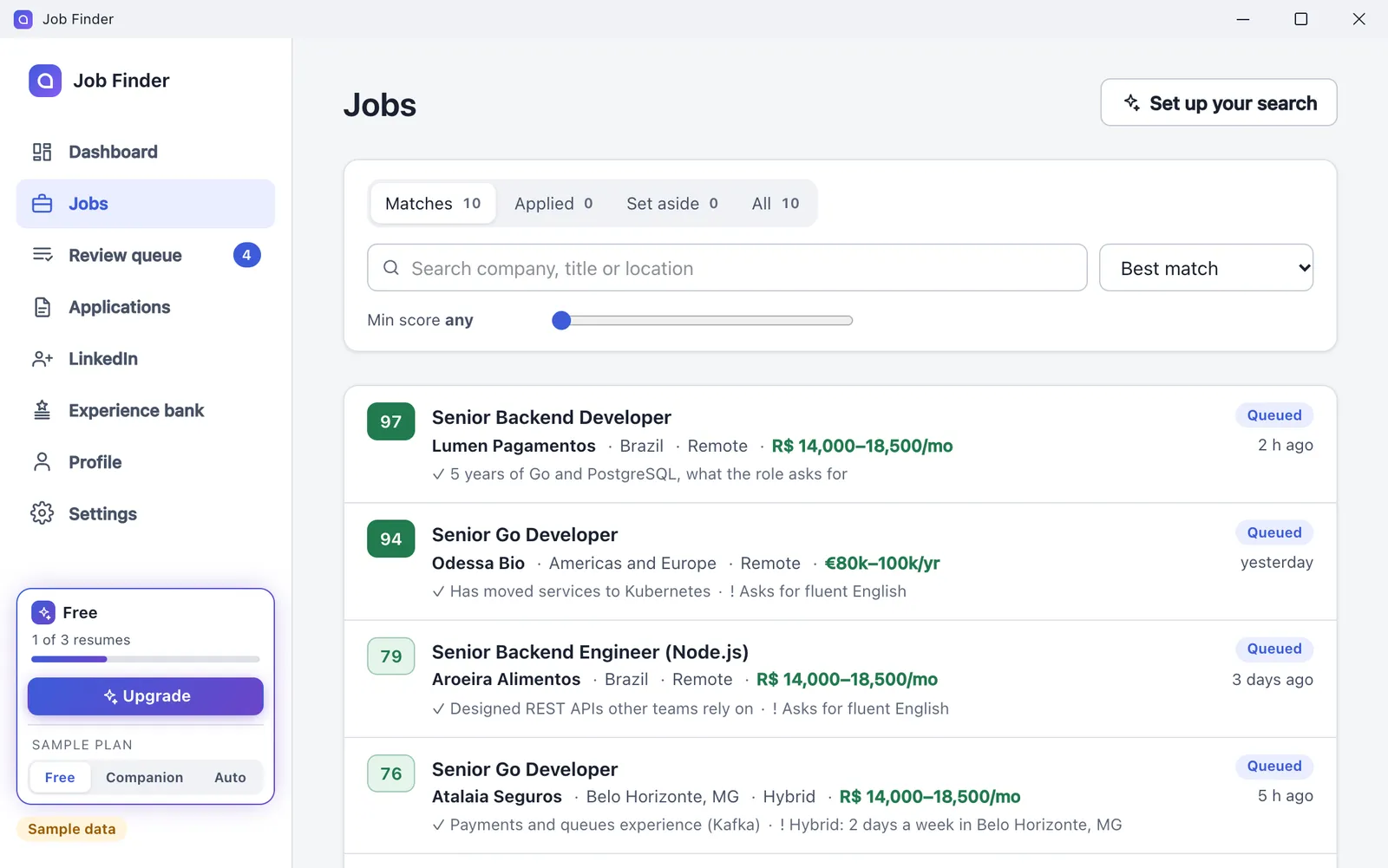
Vagalupa's Jobs screen: a list of backend jobs with green scores from 0 to 100, the company, location, pay and the reason for each score.
Sample jobs and scores, worked out in your browser. No company is real.

How it works

1,000 jobs. 5 on your desk.

The app reads everything that turns up and leaves on your desk only what's worth reviewing.

The score is how well the job fits you. It is not a chance of being hired.

One example run

One example run, step by step
StepJobs
Step 1 of 5: jobs listed (on the career sites of companies picked for your profile)1,214
Step 2 of 5: new (that you hadn't seen yet)412
Step 3 of 5: pass your filters (role, seniority, location, work mode, pay)37
Step 4 of 5: score 70 or more (from 0 to 100, with the reasons for each score)12
Step 5 of 5: in your review queue (with a tailored resume, ready to dry run and send)5

The numbers change with every search. These are from one search for senior backend roles, remote.

In four steps

  1. 1. Build your profile

    Import your LinkedIn profile and resume, and say what you're after: roles, cities or remote, pay and companies to skip. You check every fact.

  2. 2. Get scored matches

    The app searches company career sites and scores each job from 0 to 100, with its reasons.

  3. 3. A resume for each job

    For the best matches it writes a tailored resume and cover letter, in the job's language and using only what's in your profile.

  4. 4. Applications filled in

    It fills in the form on the company's site and stops before submitting. You check it and send.

Set up your profile once. The app does the repetitive work; the decisions stay with you.

Tailored resume

One resume per job.

For each good match the app picks and orders what's already in your profile, in the words the job uses.

The jobENPosted in English

Norte Pay

Senior Backend Engineer, Payments

Remote · Brazil · Full-time

You'll own the services that move money: settlement, refunds and the ledger behind every payment.

We write Go, keep our data in PostgreSQL and stream events through Kafka.

What you bring

  • 5+ years building backend services
  • Production Go
  • PostgreSQL at scale
  • Event-driven systems (Kafka or similar)

Matched keywords

Hover or tap a keyword to see where it went on the resume.

English job, English resume. Even when your profile is in Portuguese.

Before: your profile, written in Portuguese

Ana Ribeiro

Engenheira de software

São Paulo, SP · [email protected]

Experiências

Escola Código Livre · Professora voluntária de programação 2015 – 2017

  • Aulas de lógica e Python para turmas do ensino médio.

Mercado Azul · Engenheira de software 2017 – 2021

  • API de estornos em Go para 40 mil lojistas.
  • Telas internas em React.

Tecnopag · Engenheira de software sênior 2021 – hoje

  • Liquidação de cartões reescrita em Go (de 4 h para 25 min).
  • Eventos do razão no Kafka, 12 consumidores.
  • Particionamento no PostgreSQL, 900 milhões de registros.

Habilidades

Java · Python · React · Go · Docker · PostgreSQL · Kafka · gRPC · Kubernetes · AWS · Figma

After: the resume for this job, in English

Ana Ribeiro

Senior Backend Engineer

São Paulo, Brazil · [email protected] · linkedin.com/in/ana-ribeiro

Summary

Backend engineer with eight years in payments. Builds and runs Go services on PostgreSQL, with events on Kafka.

Experience

Tecnopag · Senior Software Engineer 2021 – now

  • Rebuilt card settlement in Go: the nightly batch went from 4 h to 25 min.
  • Moved ledger events to Kafka; 12 consumers, no lost messages in 18 months.
  • Partitioned PostgreSQL tables holding 900M payment records.

Mercado Azul · Software Engineer 2017 – 2021

  • Built the refunds API in Go, used by 40,000 merchants.

Skills

Go · PostgreSQL · Kafka · gRPC · Kubernetes · AWS

Languages

Portuguese (native) · English (fluent)

Never makes things up
  • Picks and orders

    Uses what's in your profile. Leads with what the job asks for.

  • In the job's language

    An English posting gets an English resume and cover letter, translated faithfully.

  • PDF and DOCX

    Download it ready to send, or open it in Word to edit.

  • Cover letter

    Written for the company and the role, from the same facts.

It never invents experience: if it isn't in your profile, it isn't on the resume.

Applications

Forms. Done.

It opens the application on the company's site and fills in your details, resume and questions. Then it stops and waits for you.

An example application form filled in by the app.
Full name
Ana Ribeiro (Profile)
Email
[email protected] (Profile)
LinkedIn profile
linkedin.com/in/ana-ribeiro (Profile)
Resume
ana-ribeiro-resume.pdf (Tailored resume)
Are you legally authorized to work in Brazil?
Yes (Saved answer)
Why do you want to work at Lumina?
I've spent the last eight years building payment systems in Go. Lumina is bringing the same rigour to booking appointments, and I want to help make that work at scale. (AI written)
Stops before submit. You check it and send.

Stops before submit. You check it and send.

Job boards

Supported sites: Where it works.

The app works directly on the career sites companies use to take applications. Here's the list, no varnish.

883company career sites in the app's directoryAnd the app learns more from the jobs you come across.

Supported sites and what the app does on each
SiteFinds jobsFills in the applicationAuto mode
GreenhouseAuto
LeverAuto
AshbyAuto
Workday³BetaYou send
SmartRecruiters³BetaYou send
Gupy³And on its portal, on every planBetaYou sign in to Gupy once, in the app's browserYou send
Sólides³And on its portal, on every planBetaYou sign in to Sólides once; its Profiler test stays with youYou send
Inhire, Quickin, Recruitee, Teamtailor and WorkableThe app tries to fill it inYou send
Recrutei—Needs a Recrutei account: you apply thereYou send
Himalayas, Jobicy, Remote OK and We Work RemotelyRemote jobsDepends on the job's siteYou send
Google JobsPaid plansDepends on the job's siteYou send
LinkedIn²The job you open in the appWhen the application is on the company's site—
Indeed¹—No integration——

AutoAuto mode: only on Greenhouse, Lever and Ashby, on the Auto plan, after you authorize it on that computer.

  1. Indeed: no integration, because Indeed's terms ban it. Indeed jobs can still show up through Google Jobs when they link to the company's site.
  2. LinkedIn: the app reads the job you open in it. When the application is on the company's site, it fills it in there; when it's LinkedIn's Easy Apply, you apply on LinkedIn itself, with the tailored resume.
  3. Beta means the form filling is new: you dry run, check and send. Auto mode doesn't use those sites yet. On other company sites the app tries to fill in the form and leaves you whatever it can't.

Privacy

Privacy: Stays on your computer.

Vagalupa runs on your computer and keeps what's yours there. Only what's needed leaves, and we tell you what and where.

Doc. A · Local file

Confidential

Stays on your computer

In a folder of yours, on your computer: the data in an SQLite database, the files beside it.

  • Your profile. Experience, education, preferences, your dealbreakers.
  • Jobs and applications. The scores, the history, where each application stands.
  • Resumes and letters. The files you import and the ones the app makes.
  • Your LinkedIn sign-in. And the app's browser data. The app never sees your password.

Doc. B · Envelope

Only what's needed

Leaves your computer

  1. Your computer
  2. Our server
  3. The AI model
Example: scoring a job

To score a job, your profile and that job go. Your LinkedIn sign-in, other jobs, applications and files stay on your computer.

  • For each task, only the part it needs. Scoring, tailoring a resume, answering a question: that part of your profile and the job goes to our server, which sends it to the AI model and returns the result. The server records usage, not content.
  • Your account. Email, name and an encrypted copy of your profile (AES-256), so you can sign in on another computer. You can turn that copy off and delete it.
  • Crash reports. Sent automatically, without personal data. You can turn this off in the app's Settings.
  • Usage statistics. Counts and kinds of action, like “a search finished”. Never what you write.
  • Payments. Through Stripe. Vagalupa never sees your card.

You can see, correct, export or delete your data, as Brazil's LGPD guarantees, most of it from inside the app.Read the privacy details

Start free

Pricing.

The Free plan already scores your jobs and explains every score. Subscribe when you want more jobs, resumes and applications.

  1. Companion

    You review and send

    R$ 79a month

    Includes:

    • 10,000 jobs scored a month
    • 30 tailored resumes a month
    • Application forms filled in
    • 100 Google Jobs searches a month
    • LinkedIn suggestions and answers to form questions
  2. Auto

    The app applies for you

    Recommended

    R$ 249a month

    Includes:

    • Everything in Companion
    • 30,000 jobs scored a month
    • 150 tailored resumes a month
    • 150 automatic applications a month
    • 300 Google Jobs searches a month
    • Auto mode

In practice

What each plan holds

Each plan's quotas
PlanJobs scored a monthTailored resumesAutomatic applications a month
Free1,000 (≈ 33 a day)3 in totalNot included
Companion10,000 (≈ 333 a day)30 a month (≈ 1 a day)Not included
Auto30,000 (≈ 1,000 a day)150 a month (≈ 5 a day)150 (≈ 5 a day)

On paid plans, quotas renew with each monthly payment; on Free, on the 1st of every month (Brasília time).

≈ a day: a rough average over a 30-day month.

Need more?

One-off packs, bought from the app, for when the month's quota runs out. They never expire.

  • 60 tailored resumesR$ 49Companion and Auto
  • 50 applications + 50 resumesR$ 49Auto

Small print

  • Prices in Brazilian reais (BRL). With a card from abroad, your bank converts them to your currency.
  • You subscribe from the app, and pay through Stripe in your browser. Nothing is sold on this site.
  • Cancel any time: your plan runs to the end of the period you paid for.
  • Full refund within 14 days. See the terms.
  • Google Jobs searches: 1 page of 10 results = 1 search.
  • The score measures how well a job fits you, not your chance of being hired.
  • No plan guarantees a job.

FAQ

Frequently asked questions: Straight answers.

Short, and all of them true.

Missing one? Write to [email protected]

Is it safe for my LinkedIn account?
You sign in to LinkedIn in the app's own window, on your computer, and the app never sees your password. It doesn't send applications through LinkedIn: when a job uses Easy Apply, you apply there yourself, with the tailored resume. For profile suggestions, it fills them in and you click Save. Letting the app save for you is optional, one edit at a time: LinkedIn doesn't allow automated changes and can restrict accounts, so it's your call. Recruiter notes have a daily cap and pause if LinkedIn shows a warning.
Does it apply without me?
Only if you want it to. By default nothing is sent without your permission: the app fills in the form, stops before submitting, and you check it and send. Auto mode is part of the Auto plan, turns on only after you authorize it on that computer, and applies only on Greenhouse, Lever and Ashby, within your minimum score, a daily cap and one application per company every 30 days (or two, if you choose). It pauses on captchas, sign-in walls or repeated errors. A sent application can't be undone, so start by reviewing.
Which sites does it work with?
It finds jobs on the career sites companies use (Greenhouse, Lever, Ashby, Workday, SmartRecruiters, Gupy, Sólides, Inhire, Recruitee, Workable and more), on remote job boards and, with a paid plan, on Google Jobs. It fills in applications on Greenhouse, Lever and Ashby; on Workday, SmartRecruiters, Gupy and Sólides form filling is in beta; on others, such as Inhire, Recruitee and Workable, it tries and leaves you whatever it can't fill. On LinkedIn, it reads the job you open in the app and fills in the application when it's on the company's site. You can also paste a job you found elsewhere. Indeed is out, because its terms ban it. The full list of sites
Does it work for jobs abroad?
Yes. It finds remote, hybrid and on-site jobs in Brazil and abroad. When the posting is in English, the resume, cover letter and form answers come out in English, translated faithfully from your profile, adding nothing.
Is the score my chance of getting hired?
No. The score, from 0 to 100, measures how well the job fits your profile and preferences, and it comes with the reasons: why it fits and the concerns. Hiring is the company's call.
What data leaves my computer?
Only the part of your profile and the job that each task needs. It goes to our server, which sends it to the AI model and returns the result; the server records usage (which task and what it cost), not content. Your account keeps your email, your name and an encrypted copy of your profile, which you can turn off and delete in Settings. Crash reports are sent automatically, without personal data (you can turn this off in Settings), and usage statistics carry counts, never what you write. Privacy details
Does the demo on this page use real AI?
No. The demo shows sample jobs and scores worked out in your browser, and what you type in it isn't sent anywhere. The app does it for real, with your profile and real jobs.
Can I cancel any time?
Yes, in the app under Settings → Account. Your plan runs to the end of the period you paid for, then moves to Free, with nothing more charged. If you bought by mistake or the app didn't work for you, ask for a full refund within 14 days of the payment.
What do I need to run it on Windows or Linux?
Windows 10 or 11, 64-bit (x64 or Arm), with WebView2, which Windows 11 and up-to-date Windows 10 already have; if it's missing, the installer sets it up. On Linux, x86_64 with glibc 2.34 or newer (Ubuntu 22.04+, Debian 12+) and WebKitGTK 4.1. The app uses the Chrome, Edge or Chromium you already have, or downloads Chromium the first time.
Do I sign up on the website?
No. Download the app and create your account inside it, with your email. The Free plan starts right away, with no card.
Will Vagalupa get me hired?
No tool can promise that. Vagalupa saves the time spent searching, tailoring and filling in forms, and helps you apply to the jobs that fit you best. Hiring is still the company's decision.


Download

Download Vagalupa: Go get it.

Free to start. No card.

Install it, create your account in the app and set up your profile in a few minutes.

Download for Windows10 / 11Download for Linuxx86_64The Mac version isn't on the site yet. For now, Windows and Linux.
Send to my computer
Email it to me

Every version:Windows10 / 11 · x64 or ArmLinuxx86_64

Linux, from a terminal, menu entry included:

curl -fsSL https://vagalupa.com.br/install.sh | sh

First start

Windows
The installer isn't code-signed yet, so SmartScreen warns you: click “More info”, then “Run anyway”.
Linux
AppImage or .tar.gz, no root needed.
Requirements
Windows 10 or 11, 64-bit, with WebView2 (the installer sets it up if it's missing). Linux x86_64 with glibc 2.34+ and WebKitGTK 4.1.

A job offer letter, the last card left on the desk, stamped: accepted.

The stamp is yours. We can't promise the job. Just less work getting there.